










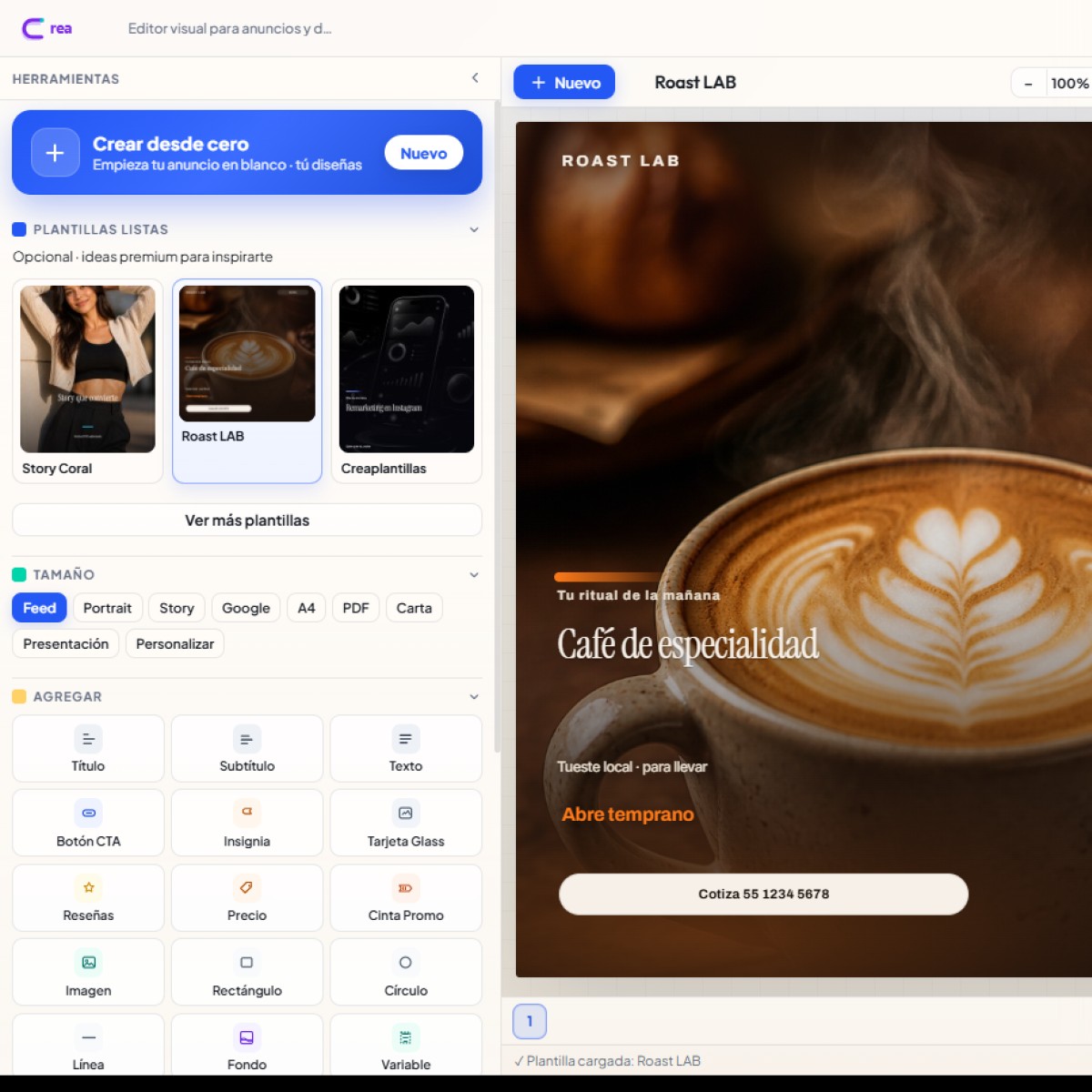
The promise is clear: less friction between the idea and the final file. Industry-specific templates, a visual editor with typography and borders, a premium collage tool for generating variations, and a freemium model with a one-time payment (no mandatory monthly subscription).

Step 1: Choose a template per channel (Meta Feed, Story, Google Ads, A4) or start blank.
CrearPlantillas is a visual template and ad editor designed for businesses that need fast, consistent, and exportable content. It doesn't replace a full branding studio; it accelerates the daily production of content that actually sells: promotions, launches, menus, visual landing pages, and social media posts.
It is especially useful for:
Within the Presticorp ecosystem, CrearPlantillas coexists with EmiteDocs (batch PDF documents) and TuRSVP (invitations with confirmation). Each tool addresses a different problem; CrearPlantillas covers advertising design and reusable templates .

Step 2: Edit text, prices, CTAs, and images on the canvas; save the project and reopen it whenever you want.
One of the most common friction points when publishing is size: what looks good in a square feed fails in a vertical story or a Google banner. CrearPlantillas includes presets for:
The gallery groups templates by industry—ecommerce, beauty, education, real estate, travel, finance, pets, health, automotive, events, and more—so you don't start with a blank canvas. You load the template, change the copy, replace the product image, and export.
The canvas works with elements (text, images, shapes, buttons, badges, prices, promotional ribbons) and a properties panel. You can adjust position, size, font, bold/italic, alignment, color, opacity, border, and radius. Layers are organized and can be locked to prevent accidentally moving the background or brand frame.
You can also:
This workflow avoids the typical back-and-forth of “download template → edit in another app → re-export → lose the previous version.” Here, the project lives in your account (or guest token), and the system administrator can monitor the entire inventory of designs when operating with the admin role.

Step 3: Premium collage — upload photos, generate 30 layouts, choose one and pass it to the editor or share it.
When you have product photos but no defined layout, the Premium Collage tool accelerates the creative process. Upload 2 to 8 images, add a title, description, or optional price, and get 30 ready-to-review designs . Choose one, send it to the editor to refine typography and branding, or share it. It's ideal for catalogs, launches, and quick A/B testing without designing each variation from scratch.
The preview and WhatsApp sharing feature is designed to validate with the client or team before committing to an export. This reduces wasted credits and allows you to finalize feedback in minutes, not days.
CrearPlantillas follows the same transparent business logic as the Presticorp ecosystem:
This approach suits businesses that experience peak campaign periods (Hot Sale, seasonal events, grand openings) and don't want to pay monthly when volume drops. You purchase export capacity, design, and publish.
1. Go to crearplantillas.presticorp.com (you can start as a guest).
2. Choose format according to the channel: Feed, Story, Google, A4, etc.
3. Upload a template from the gallery or use Collage if using parts of photos.
4. Edit texts, prices, CTA and image; save the project.
5. Export PNG/JPG and publish it on Meta Ads, organic, WhatsApp Business or print.
The editor's opinion does not replace business judgment. Some guidelines we recommend to Presticorp clients:
If you also issue diplomas or certificates for the same event, combine CrearPlantillas (visual promotion) with EmiteDocs (bulk PDF). If the event requires guest confirmation, add TuRSVP. The goal isn't to accumulate apps; it's to close the creative → promotion → operation cycle.
At Presticorp, we build websites and digital products with a practical obsession: enabling businesses to operate without relying on a fragile process . CrearPlantillas was born from seeing SMEs and sales teams struggle with disorganized files, missing versions, and incorrect formats for each network. A cloud-based editor, with local templates and controlled export, reduces that friction.
We don't promise automatic creative magic to replace strategy. We promise a production-ready environment: templates, layers, collage, project saving, and a comprehensive export package with a one-time payment. If your brand needs a consistent social media presence and quick campaign assets, this is the tool for you.
Direct URL: https://crearplantillas.presticorp.com/
You can also find it in the Premium Tools section of the Presticorp website, alongside EmiteDocs and TuRSVP.
If this article about "CrearPlantillas: Visual Editor for Ads, Templates, and Premium Collages (One-Time Payment)" has piqued your interest, the next logical step is "Premium Photo Collage: Turn Your Memories into Ads with CrearPlantillas" and "21 Benefits of Using Canva Pro: Boost Your Design and Productivity." At TuRSVP, we cover it in "Printable Paper Invitations: Physical Elegance and Templates at TuRSVP."
Enviando comentario…
 EmiteDocs
Diplomas en lote: 3/semana gratis, hasta 1000 por $500. Contratos: desde $199, hasta 100.
EmiteDocs
Diplomas en lote: 3/semana gratis, hasta 1000 por $500. Contratos: desde $199, hasta 100.
 CrearPlantillas
Editor visual. 2 gratis/mes, 5/semana con cuenta, o 20 descargas por $69 MXN.
CrearPlantillas
Editor visual. 2 gratis/mes, 5/semana con cuenta, o 20 descargas por $69 MXN.
 TuRSVP
Invitaciones con RSVP. Desde $299 MXN, pago único.
TuRSVP
Invitaciones con RSVP. Desde $299 MXN, pago único.
 Minitareas
Tableros con Google. Libre: 1 tablero. Pro: $249 MXN al mes.
Minitareas
Tableros con Google. Libre: 1 tablero. Pro: $249 MXN al mes.
 Cotización de páginas web
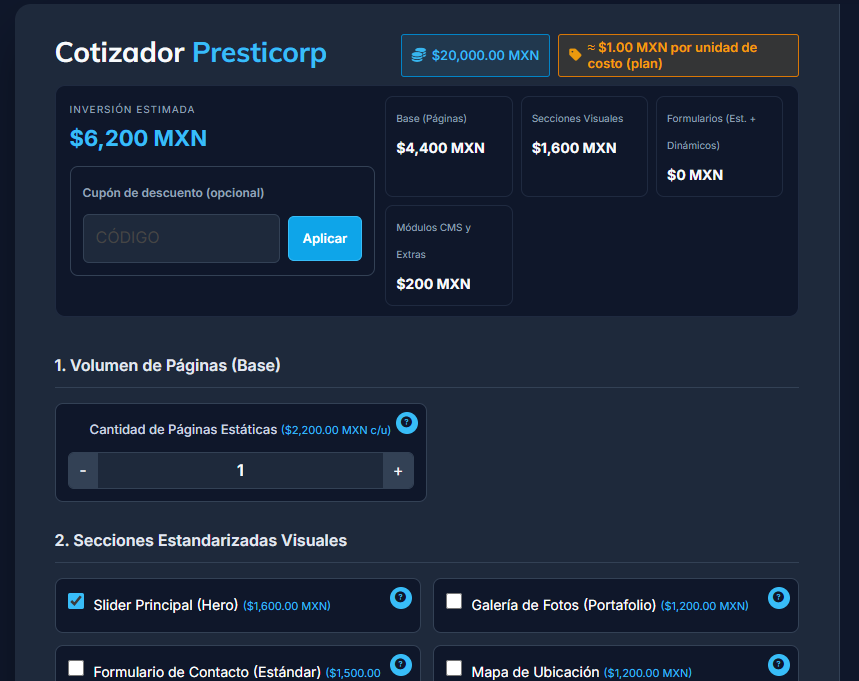
Arma tu sitio por módulos y cotiza en MXN. Usarlo no tiene costo.
Cotización de páginas web
Arma tu sitio por módulos y cotiza en MXN. Usarlo no tiene costo.
 Convertidor de formatos
Convierte Excel, Word, PDF e imágenes. $150 MXN al mes, hasta 200.
Convertidor de formatos
Convierte Excel, Word, PDF e imágenes. $150 MXN al mes, hasta 200.
 Monitor Global
Clima, sismos, huracanes y tsunamis. Consulta gratis.
Monitor Global
Clima, sismos, huracanes y tsunamis. Consulta gratis.
 Promo a la vista
Catálogo gratis. Resumen gratis o desde $200/mes. Comida destacada: $500/mes.
Promo a la vista
Catálogo gratis. Resumen gratis o desde $200/mes. Comida destacada: $500/mes.
 Ravicom
Restaurantes y platillos. Buscar y registrar es gratis.
Ravicom
Restaurantes y platillos. Buscar y registrar es gratis.

Si tu proyecto requiere una solución más enfocada, entra directo a la landing ideal para tu negocio y envíanos tu información en el formulario correspondiente.
Ofertas vigentes del catálogo, de la más nueva a la más antigua.
Ver promociones Tenis Salomon S/LAB Phantasm 2 unisex con placa de carbono a $4,759 en Salomon México (antes $6,799, −30%)
Tenis de running de competición Salomon S/LAB Phantasm 2 unisex, color blanco (White/White/High Risk Red), placa de carbono, modelo L47276600
Tenis Salomon S/LAB Phantasm 2 unisex con placa de carbono a $4,759 en Salomon México (antes $6,799, −30%)
Tenis de running de competición Salomon S/LAB Phantasm 2 unisex, color blanco (White/White/High Risk Red), placa de carbono, modelo L47276600
 Bocina Harman Kardon Luna negra a $1,699 en Coolbox (antes $2,579, −34%)
Bocina portátil Bluetooth Harman Kardon Luna color negro, 40 W, IP67, modelo HKLUNABLKAM
Bocina Harman Kardon Luna negra a $1,699 en Coolbox (antes $2,579, −34%)
Bocina portátil Bluetooth Harman Kardon Luna color negro, 40 W, IP67, modelo HKLUNABLKAM
 Bolsa Satchel Guess Carrie a $1,395 en Guess México (antes $2,790, −50%)
Bolsa satchel Guess Carrie para mujer, en negro, rojo, blanco y café
Bolsa Satchel Guess Carrie a $1,395 en Guess México (antes $2,790, −50%)
Bolsa satchel Guess Carrie para mujer, en negro, rojo, blanco y café
 Tenis ASICS MAGIC SPEED 4 mujer Black/Winter Sea a $3,009.30 en ASICS México (antes $4,299, −30%)
Tenis de running ASICS MAGIC SPEED 4 para mujer con placa de carbono, color Black/Winter Sea, modelo 1012B676.001
Tenis ASICS MAGIC SPEED 4 mujer Black/Winter Sea a $3,009.30 en ASICS México (antes $4,299, −30%)
Tenis de running ASICS MAGIC SPEED 4 para mujer con placa de carbono, color Black/Winter Sea, modelo 1012B676.001










0 Comentarios